Why does my phone still look the same after setting up Blank Spaces?
If your iPhone looks identical to before after configuring Blank Spaces, the cause is one of two things: the widget isn't placed yet, or your other home screen pages aren't hidden. Here's how to tell them apart and fix each.
1. The Blank widget isn’t on your home screen yet
Configuring apps and wallpaper inside the Blank Spaces app doesn’t change your home screen on its own. The minimalist look comes from a widget you place on iOS. There’s no “launch” or “activate” button. Placing the widget is the activation.
Symptoms:
You’ve set up your apps and wallpaper inside the Blank Spaces app
You’re looking for a launch or activate button and can’t find one
Your home screen looks exactly like it did before
The fix: add the Blank Spaces widgets to your iPhone home screen.
2. The widget is placed, but your old apps still show when you swipe
iOS keeps showing your other home screen pages by default. Even after you place the Blank widget, swiping left or right will still reveal your old apps until you explicitly hide those pages.
Symptoms:
The Blank widget is visible on one of your home screens
Swiping left or right still reveals pages with your old app icons
Blank feels like “just a widget” instead of a full home screen
The fix: hide your other home screen pages in iOS. The apps stay on your phone and remain accessible through the App Library.
Long-press on an empty area of your home screen until the apps start to jiggle.
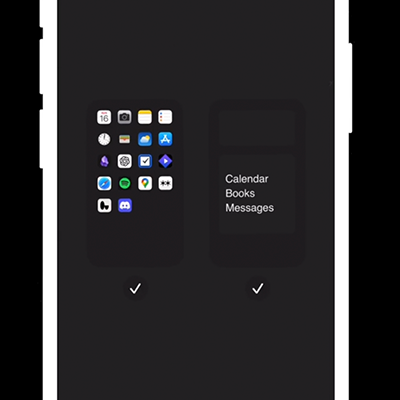
Tap the page dots at the bottom of the screen.
You’ll see a zoomed-out view of all your pages. Uncheck any pages you want to hide.
Tap Done in the top right corner.
Still not working?
If neither cause applies, try the following:
Make sure you placed both the medium and large Blank widgets. Blank uses both, and the layout looks broken with only one. How to add the Blank Spaces widgets →
Restart your iPhone. Press and hold the side button and either volume button until the power-off slider appears, drag to power off, then press the side button to turn it back on.
Update Blank Spaces to the latest version. Open in the App Store →